Skip to content

A built-in media wall starts with your TV and how you watch, then storage is planned around it. Use the chimney breast and alcoves, mix open shelving with closed cupboards, and thread cables out of sight. Choose doors that keep the front clean, such as push-to-open or pocket doors, and a finish that suits the room, so the unit frames the screen and hides the clutter around it.
A wall-mounted television looks effortless until you walk behind it. A tangle of cables, a games console balanced on the floor, a soundbar perched on a windowsill. A built-in media wall solves all of that by giving the screen and everything it connects to a home that is designed rather than improvised.
Done well, a media unit does two jobs at once. It hides the clutter that gathers around a television, and it becomes a feature in its own right, framing the screen and tying the living room together. The trick is to plan it around how you actually use the room before you start thinking about how it looks.
Start With the TV and How You Watch
Everything else follows the screen, so begin there. Decide whether the television will sit on the unit or be wall-mounted, then measure it carefully. Just as important, leave room to size up. Many people replace a set with a larger one within a few years, so it pays to design around the screen you have now while leaving space for a bigger one later, whether that is a 45 to 60-inch set today or something larger down the line.
Think about viewing height too, aiming for the centre of the screen to sit near eye level when you are seated. Then list everything else that needs a home nearby, such as a soundbar, a console, a set-top box and any Hi Fi or speakers. Knowing the full kit before you design means nothing ends up homeless once the unit goes in.
Designing Around a Chimney Breast or Alcove
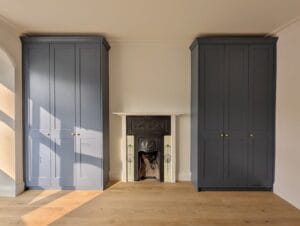
Most living rooms come with a chimney breast and an alcove on either side, and that layout is made for a media wall. The television sits centrally on or above the breast, with storage built into the alcoves to each side. Those alcoves can hold open shelving, closed cupboards or a mix of the two.
To stop a long run looking flat, the central section can be stepped forward slightly, which adds depth and visual interest around the screen. Where a room has no chimney breast, a full wall run achieves the same balanced, built-in effect, with the TV framed by storage rather than floating alone on a bare wall.
Open Shelving, Closed Cupboards or a Mix
Open shelves are for the things you want on show, such as books, records, plants and ornaments. Closed cupboards are for the things you would rather hide, such as consoles, cables, films and general clutter. Almost every media wall works best with a blend of the two.
A common and practical approach is closed storage lower down, where it does the heavy lifting and keeps mess out of sight, with open shelving higher up for display. Removable shelves are worth asking for, since they let you adjust the spacing as your equipment and collections change over the years.
Hiding the Cables and Components
The single biggest upgrade over a shop-bought stand is proper cable management. Power and HDMI leads can be threaded through the unit and out of sight, so nothing trails across the wall behind the screen. It is the detail that separates a designed media wall from a tidy-looking shelf.
Components still need to work, so anything that gives off heat or takes a remote signal can sit behind doors designed to allow airflow, or on a pull-out shelf for easy access. The key is to plan the sockets and the cable route before the unit is built, since retrofitting tidy wiring afterwards is far harder than designing it in from the start.
Door Options That Keep the Look Clean
Doors decide how tidy the finished unit looks from day to day. Push to open doors remove the need for handles, giving a smooth, minimal front that suits a contemporary room. Plain slab, shaker and glass fronted doors each set a different tone, from sleek and modern to classic and traditional.
There is also a clever option for the screen itself. Pocket doors hinge open and then slide back into the body of the unit, so they do not block the viewing angle while you are watching, then close over the television when it is off. For anyone who would rather not look at a black screen all evening, they are a neat solution.
Floating or Floor Standing, and Finishing the Look
Floating units, fixed to the wall with no visible legs, make a room feel lighter and leave the floor clear and easy to clean, which suits a modern space. Floor standing units feel more substantial and traditional, and they offer more storage volume for the same footprint.
Finish ties it all together. A hand-painted finish sits comfortably with period detailing, while a warmer combination, such as deep walnut paired with smooth sprayed satin doors, gives a minimalist, contemporary feel. Whatever you choose, keep the styling restrained, with a few considered pieces on the open shelves, so the unit frames the screen rather than competing with it.
FAQs
Can you hide all the TV cables in a media unit?
Yes. Power and HDMI cables can be threaded through the unit and out of sight, so nothing trails across the wall. The key is planning the sockets and the cable route before the unit is built, since tidy wiring is much harder to add afterwards.
Should a media unit be built around a chimney breast?
It often makes sense. A chimney breast with alcoves on either side is ideal, since the TV sits centrally on the breast and storage fits neatly into the recesses beside it. Where there is no chimney breast, a wall run creates the same balanced look.
Floating or floor standing media unit, which is better?
Neither is better outright; it depends on the room. Floating units fixed to the wall feel lighter, suit modern spaces and keep the floor clear for cleaning. Floor standing units feel substantial and traditional, and they tend to offer more storage for the same footprint.
How much space should you leave around the TV?
Enough to breathe, and enough to grow. Leave a margin around the screen so it is framed rather than boxed in, and ideally design in room for a larger television later, since many people upgrade within a few years and a tight recess can date.
Can a built-in media unit include shelving and cupboards together?
Yes, and most do. A mix works best, with closed cupboards lower down to hide consoles, cables and clutter, and open shelving higher up for books, records and display pieces. Removable shelves let you adjust the layout as your equipment and collections change over time.
Media Walls That Hide The Clutter Completely
Cabinetry is all Humphries Cabinets does, and over more than 15 years we have designed and fitted media units, cupboards and shelving across London from our base in Charlton, covering every borough. Because cabinetry is all we do, we put real care into the details that make a media wall work, from concealed cabling and proper ventilation to pocket doors that tuck the screen away. Every project starts with a free design visit and a full set of plans, so you can see how your living room will look, with the clutter hidden and the screen framed, before anything is built.